Our computers and smartphones help us store pictures and videos that hold priceless memories we never want to lose. However, if not backed up, we stand a high risk of losing them in case the computer gets damaged or stolen. PhotoStick OMNI is a fantastic gadget that gets your photo and video backup job done in minutes.
So, how do you use a PhotoStick OMNI? All you need to do is plug this gadget into your computer or smartphone. Let it install its drivers and pre-installed software. After that, it will scan and retrieve all the images and video files. Finally, click “Go!” to store them on your PhotoStick OMNI gadget.
This gadget is designed to automatically scan, discover and save all the photographs and videos from your computer, so you don’t have to upload them one at a time. In this article, we uncover everything about PhotoStick OMNI, how to use it, its advantages, and answer some of your frequently asked questions.
What is PhotoStick OMNI?
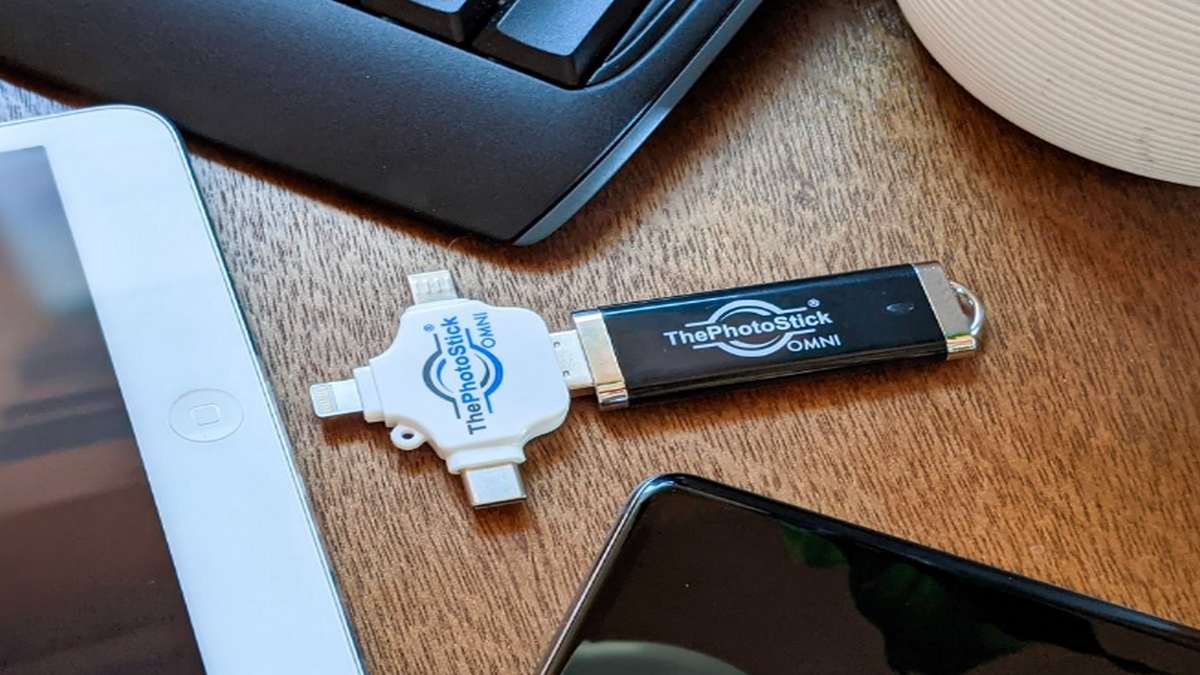
The PhotoStick OMNI is a tiny yet powerful portable gadget that resembles a traditional USB thumb drive. It quickly locates, downloads, and securely stores images, movies and other files from a computer, smartphone or tablet. It works by retrieving and saving these files automatically, saving you the hustle of manually doing it.


The PhotoStick OMNI gadget is compatible with almost all varieties of devices in the market, including computers (Windows and Mac), smartphones (Android and iOS), tablets and iPads. It is simple to use; plug and play. It does not require an internet connection or extra accessories. It also does not have any monthly subscription fee.
How Do You Use PhotoStick OMNI?
Since it does not require additional software download or extra accessories, using PhotoStick OMNI is straightforward. Here is how to use PhotoStick OMNI on various devices:
1) Using PhotoStick OMNI on Windows
- Plug your PhotoStick OMNI device into your computer via a USB port.
- Navigate to “This PC” and open the PhotoStick folder.
- Run the “PhotoStick.exe” file by double-clicking on it.
- After the installation process is complete, launch the application.
- It will automatically scan your computer, click “Go!” to backup.
2) Using PhotoStick OMNI on Mac
- Plug your PhotoStick OMNI device into your Mac via a USB port.
- A shortcut labeled “PhotoStick Mac” will appear on your desktop.
- Drag the shortcut file to your Applications folder.
- Navigate to the Application folder and launch your PhotoStick Mac application.
- It will automatically scan your computer for photo and video files; click “Go!” to backup.
3) Using PhotoStick OMNI on Android
- From the Play Store, download and install the PhotoStick application.
- Use the provided OTG adaptor to connect your PhotoStick OMNI device to your Android phone/tablet.
- Launch the application you downloaded and tap “Backup Files.”
- You’ll have two options, “Select to Backup” and “Backup all”. Choose your preferred.
- Once you select an option, your chosen photo and video files will be stored in the PhotoStick OMNI device.
N/B PhotoStick OMNI is compatible with Android version 5.0 or later.
4) Using PhotoStick OMNI on iOS
- From the App Store, download and install the PhotoStick application.
- Using the provided OTG connect your PhotoStick OMNI to your iPhone or iPad.
- Launch the application you downloaded and allow access to photos and videos.
- Select the photos and videos you want to backup.
- Tap “Start” to begin the backup process.
Benefits of PhotoStick OMNI
The multiple benefits customers get with PhotoStick OMNI devices are the reason for all the excitement and attention they receive in the internet world. The following are some of the benefits of utilizing PhotoStick OMNI:
- Compact and lightweight – The PhotoStick OMNI is roughly the same size as a standard thumb drive. This makes it easy to take it wherever you go with so much ease. It’s small enough to fit in your pocket or handbag.
- Safe and Secure – PhotoStick OMNI includes a high-level encryption mechanism that secures your saved data. It’s also completely safe to use on any computer. It does not put your computer’s security at risk by infecting it with malware or hacking it.
- Cost-effective — The PhotoStick gadget is inexpensive. It is low-priced for a gadget that gives such a degree of data security. There is also the option of paying on a regular basis or signing up for a monthly membership. Buy and use forever.
- Easy to use — When it comes to simplicity of use, PhotoStick OMNI takes the lead. It has built-in software that scans, retrieves, and saves your photographs and movies automatically. All you need is to plug it into your computer and launch it.
- Works on All Devices – You may use this gadget anywhere and any system. Since it does not need a device driver, you may use it on any system, Windows, Mac, Android or iOS.
- Self Sufficient – PhotoStick OMNI contains everything it needs to function. It does not need internet or a software download. It comes with pre-installed software that gets the job done.
Other benefits worth noting are; its rapid speed while transmitting and locating files. It automatically arranges files for easier finding. It handles several different sorts of files. It comes with a free universal adaptor, etc.
Frequently Asked Questions
Here are some of your frequently asked questions:
● Does PhotoStick OMNI delete duplicate files?
No. PhotoStick OMNI does not delete any of your files. However, you can choose which files you want to keep, remove or keep source folder names, or delete duplicate files yourself.
● Is PhotoStick OMNI safe?
Yes. PhotoStick OMNI is safe and secure to use. It does not expose your devices to any risk, virus or hacking. It also has a data encryption mechanism to keep your files secured.
● What file types does PhotoStick OMNI support?
PhotoStick OMI supports most photo and video file formats and document file types. Besides the standard JPEG, GIF, PNG, MPEG4, and MOV, it also supports other file formats such as BMP, AVI, WMV, PCT, Camera Raw, Photoshop files, TIFF etc.
Final Word
PhotoStick OMINI provides the best and easiest means of backing up your valuable photos and videos from any device. It is safe and secure with a state-of-the-art data encryption mechanism.
Unlike regular USB thumb drives, PhotoStick OMNI automatically finds, retrieves, and backups your files. It also sorts them for you to quickly find them, thus saving you lots of time.
If you are the type of person who frequently moves around changing devices, PhotoStick would be your best companion in keeping your files secured.
-
-

-

-

-
-

-

-