Recovery Mode is a specialized boot environment built into Android devices like the Xiaomi Poco C61. It offers a suite of tools independent of the main operating system, making it invaluable for troubleshooting and advanced system actions. In this guide, we’ll help you access / enter the recovery mode Xiaomi Poco C61, through a step-by-step guide, and learn to use it wisely.
Here are some common scenarios where accessing Recovery Mode might be necessary:
- Factory Reset: Performing a factory reset when your device is unresponsive or you can’t access the Settings menu.
- Manual Updates: Installing operating system updates manually if over-the-air updates fail.
- Cache Clearing: Wiping the cache partition, which can potentially resolve performance issues.
It’s important to note that accessing Recovery Mode should be done with a degree of caution. Certain options within this mode could lead to data loss if not handled correctly.

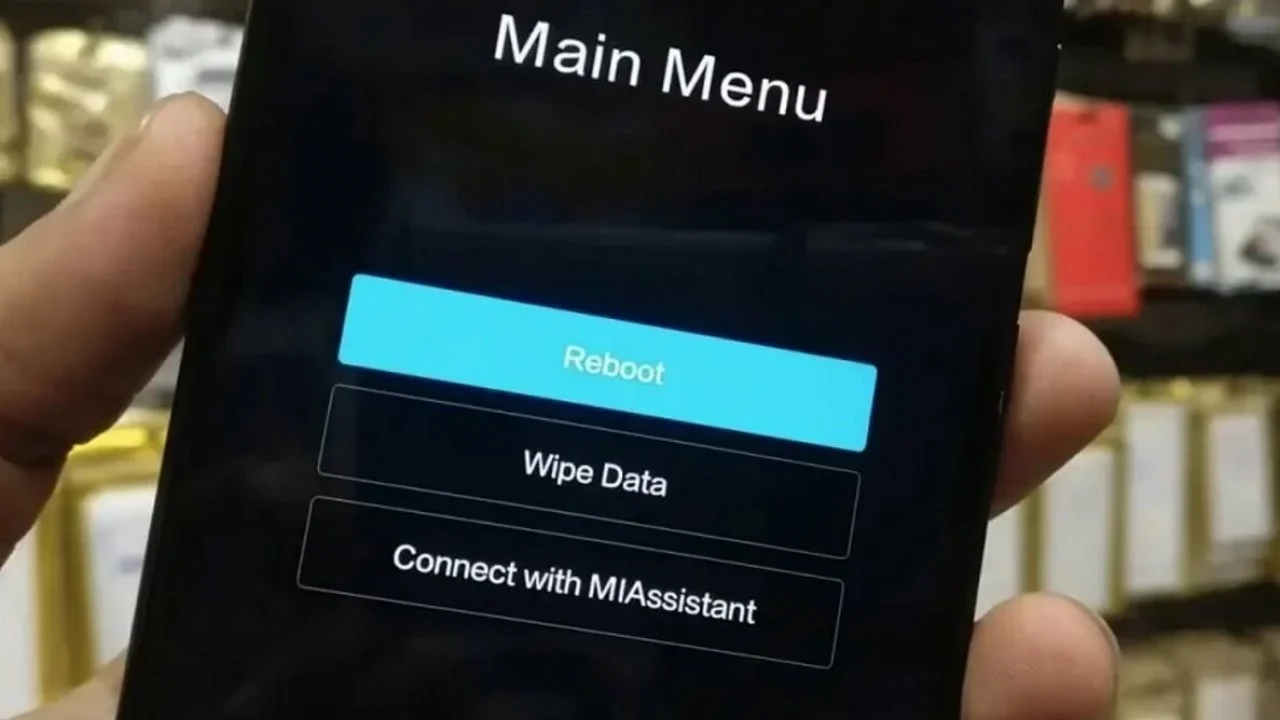
How to access Recovery Mode on Xiaomi Poco C61
Entering Recovery Mode on your Xiaomi Poco C61 requires a specific sequence of button presses. Here’s a step-by-step guide:
1. Power Off
- Begin by ensuring your Xiaomi Poco C61 is completely turned off. If the device is unresponsive, you may need to perform a forced shutdown by holding the power button for an extended period (typically around 10 seconds).
2. Key Combination
- Press and hold the power button and the volume up button at the same time.
- Continue holding both buttons down firmly.
3. Mi Recovery Screen
- When the Mi Recovery screen appears, you can release both the power and volume up buttons. This screen usually features the Xiaomi logo or a simple text-based interface.
Important Notes
- The timing of the button presses is crucial. Ensure you are pressing the power and volume up buttons simultaneously.
- If performed correctly, you might feel a slight vibration when the Mi Recovery screen loads.
- In case you are unsuccessful on the first attempt, power the device back on normally and try again.
Troubleshooting
- If you continue to encounter difficulties entering Recovery Mode, ensure your device has sufficient battery charge. You may want to connect it to a charger and retry the process.
- In rare cases, a hardware issue with your volume or power buttons could hinder the process. If you suspect this, it might be necessary to seek assistance from a Xiaomi service center.
That’s it. You can easily get the access to the recovery mode on your Poco C61. Now, going ahead, we’ll learn about different features and settings available in this mode.
However, you must use them wisely, or else, you might end-up losing the data saved on your phone.
How to use Recovery Mode on your Poco C61
Once you have entered Recovery Mode, navigation is relatively straightforward. Here’s how to interact with the menu:
- Volume Buttons: Use the volume up and volume down buttons to move the selection highlight up or down the list of options.
- Power Button: Press the power button to confirm the currently highlighted selection.
Common Options
While the specific options might vary slightly based on your MIUI version, here are the most common ones you’ll encounter:
- Reboot: This option will exit Recovery Mode and restart your device normally.
- Wipe Data (Factory Reset): This performs a full factory reset, erasing all user data. Use this option with caution, and only if absolutely necessary.
- Connect with MIAssistant: This option facilitates a connection with Xiaomi’s troubleshooting tools, usually requiring a computer. This is more for advanced users.
- Others (may include): Options like “Wipe Cache Partition”, “Apply Update from SD Card” might be present depending on your phone’s specific software.
Important Notes
- Read the description of each option carefully before making a selection. Some options have the potential to cause data loss.
- If you are unsure about an option, it’s best to research it further or exit Recovery Mode without making changes.
- When in doubt, the “Reboot” option is the safest way to exit Recovery Mode and return to normal phone operation.
Also see: How do I soft or factory reset Xiaomi Poco C61
How to exit the Recovery Mode
To safely exit Recovery Mode and boot your Xiaomi Poco C61 back into the regular Android operating system, follow these steps:
- Locate the Reboot Option: Using the volume buttons, navigate within Recovery Mode to find the option labeled “Reboot” or “Reboot system now”. This option is usually located at the top or bottom of the list.
- Confirm Selection: Once you have highlighted the “Reboot” option, press the power button to confirm your selection.
- Normal Boot: Your Xiaomi Poco C61 will initiate the reboot process. If successful, it will load the standard Android operating system.
Important: If your device becomes stuck in Recovery Mode or does not boot normally, re-enter Recovery Mode and consider performing a factory reset (“Wipe Data”). Remember, this will erase all user data on your phone.
Important Note: Exercise caution when using Recovery Mode, as certain options have the potential to cause data loss.
Getting access to the Recovery Mode on your Xiaomi Poco C61 provides access to tools for troubleshooting and system modification. Remember to use these options with care. Always exit Recovery Mode safely using the “Reboot” option to return to regular device operation.
-

-

-

-

-

-

-

-

