
Google Classroom is an educational platform developed by Google. It is designed to help educators create, distribute, and manage assignments, as well as communicate with their students. Google Classroom is part of Google Workspace for Education (formerly known as G Suite for Education), and it integrates with other Google apps like Google Docs, Google Sheets, and Google Drive.
What is Google Classroom?
Google Classroom is an online platform developed by Google for educational purposes. It provides a digital space where teachers and students can interact, collaborate, and manage various aspects of the learning process. Google Classroom is particularly popular in K-12 schools and higher education institutions, as well as among educators who use Google’s suite of productivity tools.
Here are some key components and functions of Google Classroom:
- Class Creation: Teachers can create virtual classrooms for their students. Each class is given a unique code or link that students can use to join the class.
- Assignment Management: Teachers can create and distribute assignments, quizzes, and other coursework to students through Google Classroom. Students can access these assignments, complete them digitally, and submit their work within the platform.
- Announcements: Teachers can make announcements to the entire class, providing updates, reminders, or important information.
- Stream: The Stream is a chronological feed where teachers and students can post messages, comments, and share links or files. It serves as a communication hub within the class.
- Integration with Google Apps: Google Classroom seamlessly integrates with other Google productivity apps like Google Docs, Google Sheets, Google Slides, and Google Drive. This allows for easy document creation, sharing, and collaboration within the classroom.
- Calendar Integration: Assignments and due dates are automatically synced with Google Calendar, helping students keep track of their tasks and deadlines.
- Class Roster: Teachers can see a list of students in each class, manage student information, and invite students to join the class.
- Google Meet Integration: Google Classroom can be integrated with Google Meet, enabling teachers to conduct virtual classes, video conferences, and live discussions with students.
- Guardian Notifications: Parents or guardians can receive email summaries of their child’s assignments and class activities if the teacher enables this feature, promoting better communication between educators and families.
- Feedback and Grading: Teachers can provide feedback on assignments, and students can view their grades and comments within Google Classroom.
Google Classroom streamlines many aspects of the teaching and learning process, making it easier for educators to manage their classes, share resources, and communicate with students, whether in a physical classroom or a virtual learning environment. It has become a valuable tool for educators seeking to leverage technology in education.

Benefits of Google Classroom classes?
Google Classroom offers several benefits for both educators and students, which contribute to its popularity as an educational platform. Here are some of the key benefits of using Google Classroom for classes:
- Simplified Workflow: Google Classroom streamlines the workflow for teachers by providing a centralized platform for creating, distributing, and managing assignments and class materials. It reduces paperwork and administrative tasks.
- Efficient Assignment Management: Teachers can create, distribute, and collect assignments digitally, making it easier to track student progress and provide timely feedback.
- Enhanced Collaboration: Google Classroom integrates seamlessly with Google Drive, Docs, Sheets, and other productivity tools. This fosters collaboration among students on group projects and assignments in real-time.
- Easy Communication: Teachers can communicate with students individually or as a class through announcements and comments. This promotes effective communication and helps clarify doubts.
- Access from Anywhere: Google Classroom is accessible from any device with an internet connection, allowing students and teachers to access course materials and assignments from home or on the go.
- Real-Time Updates: Assignments, due dates, and announcements sync with Google Calendar, helping students stay organized and on top of their tasks.
- Paperless Environment: Google Classroom promotes environmental sustainability by reducing the need for physical textbooks and printed assignments.
- Instant Feedback: Teachers can provide prompt feedback on assignments and assessments, which can enhance the learning experience for students.
- Integration with Google Meet: Google Classroom can be integrated with Google Meet, facilitating online classes, video conferencing, and live discussions.
- Guardian Notifications: Parents or guardians can receive email summaries of their child’s class activity, allowing them to stay informed about assignments, due dates, and their child’s progress.
- Customization: Teachers can customize their class settings, such as grading scales, late work policies, and access controls, to suit their teaching style and class requirements.
- Data Security: Google Classroom is part of Google Workspace for Education, which offers robust security features and data protection, ensuring the safety of student information.
- Cost-Effective: Many of the basic features of Google Classroom are available for free, making it a cost-effective solution for educational institutions.
- Scalability: Google Classroom is suitable for both small and large classes, making it adaptable to different educational settings.
- Feedback and Analytics: Teachers can track student progress, view engagement metrics, and generate reports to analyze class performance.
Overall, Google Classroom simplifies the teaching and learning process, fosters collaboration, and provides a digital environment that supports modern education methods. It has become a valuable tool for educators looking to leverage technology for more effective and efficient teaching.
History of Google Classroom
Google Classroom is a relatively new addition to Google’s suite of educational tools and services. It was launched by Google in August 2014, making it less than a decade old. Here is a brief history of Google Classroom:
- Launch in August 2014: Google Classroom was officially introduced to the public in August 2014. It was designed to provide educators and students with a digital platform to streamline the process of creating, distributing, and managing assignments and class materials.
- Early Stages: In its early stages, Google Classroom focused on simplifying tasks such as assignment distribution, submission, and grading. It integrated with other Google apps like Google Drive and Google Docs to facilitate collaboration.
- Initial Reception: Google Classroom was well-received by educators for its user-friendly interface and integration with other Google services commonly used in education.
- Ongoing Development: Google continued to develop and refine Google Classroom in response to feedback from educators and schools. Over time, new features and enhancements were introduced to make it a more robust and versatile platform for online and blended learning.
- Growth and Adoption: Google Classroom gained widespread adoption in K-12 schools and higher education institutions, particularly among those that adopted Google Workspace for Education (formerly known as G Suite for Education). Its accessibility and cost-effectiveness contributed to its popularity.
- Integration of Google Meet: In response to the increased demand for virtual learning tools during the COVID-19 pandemic, Google integrated Google Meet, its video conferencing platform, more tightly with Google Classroom. This allowed teachers to conduct virtual classes and meetings within the platform.
- Guardian Notifications: Google Classroom introduced a feature that allowed parents or guardians to receive email summaries of their child’s assignments and class activities, enhancing communication between educators and families.
- Continued Updates: Google continued to release updates and new features to improve the functionality of Google Classroom, including improved grading tools, advanced class customization options, and better integration with third-party educational apps.
- Collaborative Tools: The platform introduced features like Google Jamboard integration for collaborative activities, making it more versatile for different types of learning experiences.
- Privacy and Security: Google emphasized its commitment to data privacy and security in education, adhering to compliance standards and providing tools for administrators to manage data and privacy settings.
It’s important to note that Google Classroom is part of the broader Google for Education ecosystem, which includes various other tools and services designed for educational use. The platform has evolved over the years to meet the changing needs of educators and students, especially as digital learning and remote education became more prevalent.
Can I download Google Classroom?
Google Classroom is a web-based platform, and it does not require you to download any software or mobile apps to use it on a computer. You can access Google Classroom through a web browser on your desktop or laptop computer by simply going to the Google Classroom website (classroom.google.com) and signing in with your Google account.
However, if you want to access Google Classroom on a mobile device like a smartphone or tablet, you can download the Google Classroom app. The app is available for both Android and iOS devices and can be downloaded from the respective app stores:
- For Android: You can download the Google Classroom app from the Google Play Store – here.
- For iOS (iPhone/iPad): You can download the Google Classroom app from the Apple App Store – here.
Downloading the mobile app can provide a more convenient and optimized experience when using Google Classroom on smaller screens and touch devices. It allows you to receive notifications, access assignments, and interact with your classes on the go.
So, while you don’t need to download Google Classroom to use it on a computer, you can choose to download the mobile app for a more mobile-friendly experience.
How do Google Classroom students login?
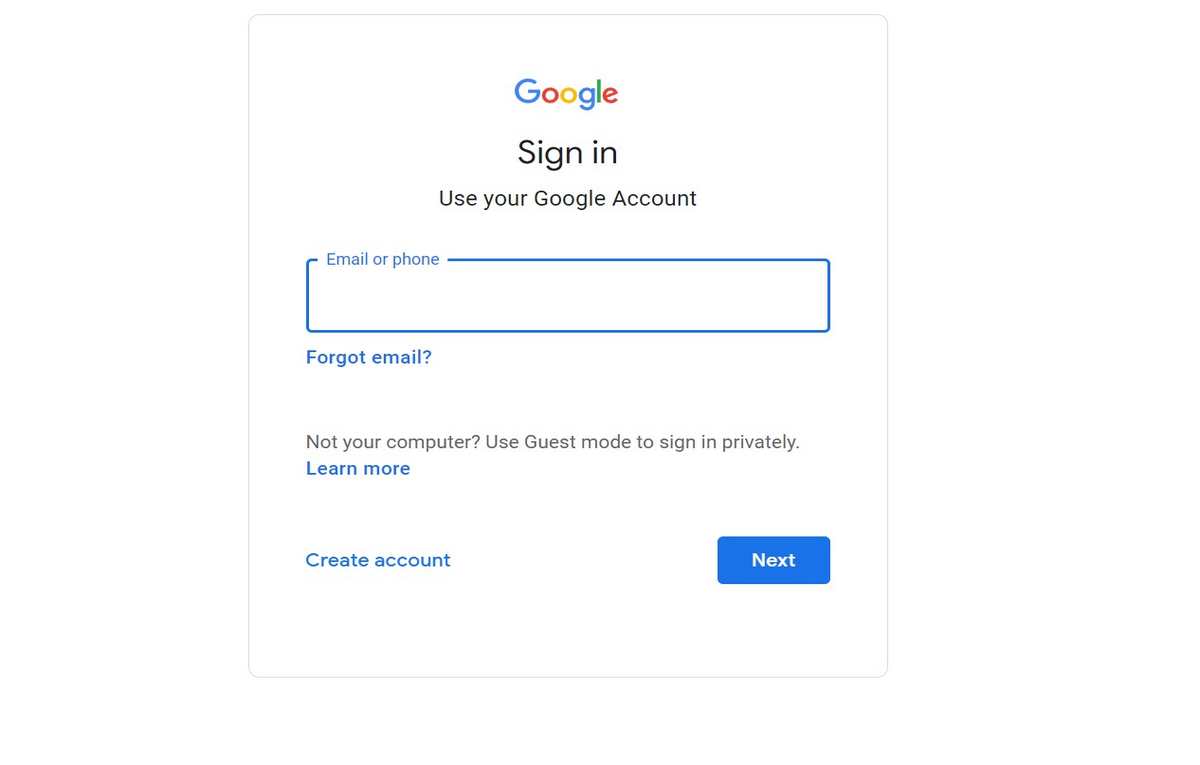
Students can log in to Google Classroom to access their classes and assignments if they have been enrolled by their teachers. To log in as a student, follow these steps:
- Access Google Classroom: Open a web browser on your computer or mobile device and go to the Google Classroom website, which is typically located at “classroom.google.com.”
- Sign In: On the Google Classroom login page, click on the “Sign In” button in the top-right corner.
- Enter Your Google Account Credentials: You’ll need to enter your Google account credentials to sign in. This includes your Gmail email address (or the email address associated with your Google account) and your password.
- Click “Next”: After entering your email address, click the “Next” button.
- Enter Your Password: On the next screen, enter your Google account password and click “Next.”
- Choose an Account (if necessary): If you have multiple Google accounts or are using a shared computer, you may be prompted to choose the account you want to use. Select the correct account.
- Access Your Classes: Once you’ve entered your credentials and chosen your account (if necessary), you will be taken to your Google Classroom dashboard. Here, you’ll see a list of the classes you are enrolled in and can access assignments, class materials, and communicate with your teachers and classmates.
If you’re logging in for the first time, you may need to enter a class code provided by your teacher to join a specific class. Teachers typically share this code in person or through email or other communication channels.

Remember to keep your login information secure and, if needed, you can use the “Forgot password?” or “Need help?” links on the login page to reset your password. Additionally, if your school or educational institution uses Google Workspace for Education, you may have a customized login page provided by your institution. In such cases, your school’s IT department can provide guidance on the login process.
How to leave a google classroom?
Leaving a Google Classroom as a student is a straightforward process. Here are the steps to leave a Google Classroom:
- Sign In: Make sure you are signed in to your Google account that you used to access Google Classroom.
- Access the Class: Go to the Google Classroom website (classroom.google.com) and sign in if you aren’t already.
- View Your Classes: On the Google Classroom homepage, you’ll see a list of the classes you are enrolled in. Click on the class you want to leave.
- Click on “People”: In the class, look for the “People” tab on the top menu, and click on it. This tab typically displays a list of the teacher and the students in the class.
- Find Your Name: Scroll down the list of students to find your own name.
- Leave the Class: Next to your name, you should see three vertical dots (options menu). Click on those dots.
- Select “Leave”: A small menu will appear. Click on “Leave” to exit the class.
- Confirm Your Decision: A confirmation dialog may appear asking if you are sure you want to leave the class. Confirm your decision to leave the class.
Once you’ve completed these steps, you will no longer be a member of that Google Classroom, and you won’t receive any notifications or updates related to that class.
Please note that if you accidentally leave a class, you can typically rejoin it by using the class code provided by the teacher. However, if you leave a class, your work and assignments submitted to that class may no longer be accessible to you, so be sure to download or save any important materials before leaving if necessary.
Features of Google Classroom app?
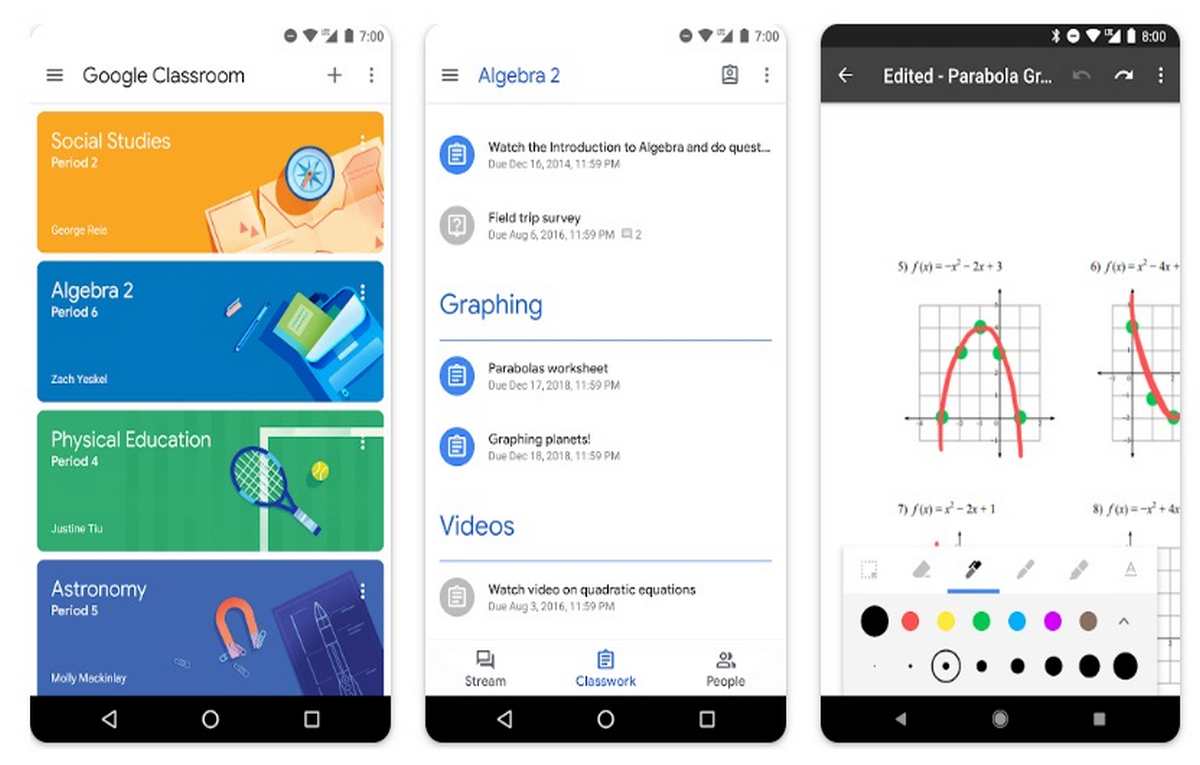
Google Classroom app for mobile devices (Android and iOS) provided several features that allowed students and teachers to access and manage their classes and assignments while on the go. Please note that features and functionality in mobile apps can change over time as they are updated by developers. Here are some of the key features of the Google Classroom app as of my last update:
- Access to Classes: Students and teachers can access their Google Classroom classes and assignments from anywhere using the mobile app.
- Assignment Management: Students can view, complete, and submit assignments directly through the app. Teachers can create and manage assignments on the go.
- Announcements: Teachers can make class announcements, and students can view and respond to them within the app.
- Class Stream: The app includes a stream where announcements, comments, and class updates are displayed chronologically.
- Integration with Google Drive: Users can easily access and attach files from Google Drive when working on assignments or sharing resources.
- Push Notifications: The app provides push notifications to keep users informed about new assignments, announcements, and other class activities.
- Mobile-Friendly: The app is optimized for mobile devices, making it easy to navigate and interact with class content on smaller screens.
- Offline Access: Users can access certain features and view class materials even when they are offline, which is useful for studying on the go without an internet connection.
- Real-Time Collaboration: Students can collaborate on assignments and projects in real-time, just like on the web version of Google Classroom.
- Submit Photos: Students can take photos and attach them as part of their assignment submissions.
- Teacher and Student Views: Teachers and students have different views within the app, with teachers having additional controls for managing classes.
- Calendar Integration: Assignments and due dates are synced with the device’s calendar, helping students and teachers stay organized.
- Guardian Summaries: Parents or guardians who have been invited by teachers can receive email summaries of their child’s class activities.
- Feedback and Grading: Teachers can provide feedback and grades for assignments within the app.
- Google Meet Integration: Google Classroom integrates with Google Meet for virtual classes and video conferencing, and this functionality is accessible through the app.
Does Google Classroom have games?
Google Classroom itself does not have built-in games or game-based features. Google Classroom primarily serves as a platform for educators to create, distribute, and manage assignments and class materials, as well as facilitate communication with students. It focuses on classroom management and collaboration rather than gaming.
However, teachers can integrate various educational games and learning activities into their Google Classroom assignments and activities. Here are some ways teachers can incorporate games into their Google Classroom experience:
- Embed Links to Educational Games: Teachers can include links to online educational games or interactive activities in their assignments. Students can click on these links to access and play the games.
- Create Quizzes and Polls: While not traditional games, interactive quizzes and polls can engage students and make the learning experience more interactive. Teachers can create quizzes using Google Forms and share them with students through Google Classroom.
- Use Google Slides for Game-Based Learning: Teachers can create interactive Google Slides presentations that incorporate games, puzzles, or quizzes. Students can collaborate on these slides or work individually.
- Gamify Learning with Classcraft or Kahoot!: While not directly within Google Classroom, platforms like Classcraft and Kahoot! allow teachers to gamify the learning experience and then share the links or results with students through Google Classroom.
- Google Jamboard for Collaborative Activities: Google Jamboard can be used for collaborative drawing, brainstorming, and interactive activities that resemble games.
- Coding Challenges: Teachers can introduce coding challenges or coding games to students using platforms like Scratch or Code.org. They can then share the links to these activities through Google Classroom.
- Escape Room Challenges: Some teachers create digital escape room challenges using Google Forms or other tools and share them as assignments in Google Classroom.
- Math and Vocabulary Games: There are various math and vocabulary games available online that teachers can incorporate into their lessons and assignments.
It’s important to note that the specific games and activities you can use will depend on your grade level, subject, and educational goals. Teachers can explore these options and tailor them to their specific teaching needs and objectives.

Is Google Classroom down?
To check the status of Google Classroom or other Google services, you can visit the Google Workspace Status Dashboard, which provides real-time information about the operational status of various Google services, including Google Classroom. Here’s how you can access it:
- Open a web browser and go to the Google Workspace Status Dashboard: Google Workspace Status Dashboard
- On the status dashboard page, you will see a list of Google services. Look for “Google Classroom” in the list.
- The status of each service will be indicated by color-coded icons. Green typically means the service is operating normally, while yellow or red may indicate issues or outages.
- Click on the “Google Classroom” row to view more details about its current status and any reported incidents or disruptions.
If you see that Google Classroom is experiencing issues or outages, you can check for updates and estimated resolution times on the status dashboard. It’s also a good idea to follow any official announcements or notifications provided by Google for further information and updates regarding service interruptions.
Is there a Google Classroom dark mode?
Google Classroom did not have an official dark mode within the platform itself. However, the availability of dark mode can change, and Google has been gradually introducing dark mode options for many of its applications and services, including Google Classroom.
To enable dark mode for Google Classroom, you would typically need to enable system-wide dark mode on your operating system or device (Windows, macOS, Android, or iOS), and if Google Classroom supports dark mode on that platform, it should adapt accordingly. Here’s how you can enable system-wide dark mode on some common platforms:
For Android:
- Open the “Settings” app on your Android device.
- Scroll down and select “Display.”
- Look for the “Dark theme” or “Dark mode” option and turn it on. This should enable dark mode for compatible apps, including Google Classroom.
For iOS (iPhone/iPad):
- Open the “Settings” app on your iOS device.
- Scroll down and select “Display & Brightness.”
- Under the “Appearance” section, choose “Dark” to enable dark mode. Again, this should apply dark mode to compatible apps like Google Classroom.
For Windows 10 or 11:
- Open the “Settings” app on your Windows computer.
- Go to “Personalization.”
- In the “Colors” section, select the “Dark” option under “Choose your color.”
For macOS:
- Click the Apple menu and select “System Preferences.”
- Choose “General.”
- Under “Appearance,” select “Dark” to enable dark mode.
Please note that the availability of dark mode for Google Classroom may vary depending on your device and the version of the app you have installed.
To enable dark mode for other Google apps, such as Gmail and Google Docs, you can typically follow a similar process of enabling system-wide dark mode on your device, and the apps will adjust their appearance accordingly.
Wrap-up
Google Classroom is an online platform developed by Google that has had a significant impact on education. It was introduced in 2014 and has since become a popular tool for educators and students around the world. Here are some key points to conclude about Google Classroom:
- Streamlining Education: Google Classroom simplifies various aspects of teaching and learning, including assignment management, communication, and collaboration. It provides a centralized platform for educators to create and distribute assignments and class materials.
- Accessibility: The platform is accessible from various devices with an internet connection, making it suitable for both in-person and remote learning environments. Its mobile app allows for on-the-go access.
- Integration with Google Apps: Google Classroom seamlessly integrates with other Google productivity tools, such as Google Drive, Google Docs, Google Sheets, and Google Meet. This integration enhances collaboration and document sharing.
- Communication Hub: Google Classroom offers features for teachers to communicate with students through announcements and comments. It also allows parents or guardians to receive email summaries of their child’s class activity.
- Grading and Feedback: Teachers can provide feedback and grades on assignments, making it easier to assess student progress. Students can view their grades and comments within the platform.
- Flexibility and Customization: Educators have the flexibility to customize class settings, set grading scales, and define late work policies to suit their teaching style and class requirements.
- Cost-Effective: Many of Google Classroom’s basic features are available for free, making it an accessible and cost-effective solution for educational institutions.
- Privacy and Security: Google emphasizes data privacy and security, especially in the context of educational use. The platform complies with privacy regulations and provides tools for administrators to manage data and privacy settings.
- Educational Ecosystem: Google Classroom is part of the broader Google for Education ecosystem, which includes various tools and services designed to enhance the educational experience.
- Continual Development: Google Classroom has seen continual development and updates, with new features and enhancements being introduced over the years to improve functionality and address evolving educational needs.
In conclusion, Google Classroom has played a significant role in modernizing and digitizing education, particularly in the context of blended and remote learning. Its user-friendly interface, integration with Google apps, and focus on collaboration and communication have made it a valuable tool for educators and students alike. As technology continues to evolve, Google Classroom is likely to remain an important platform in the field of education.
-

-

-

-

-

-

-

-

