Got a brand new Google Pixel 8a? Awesome! There’s no doubt that this phone is already super cool, but you can make it even better with the right apps.
We’ve picked out 10 of the best apps that should help you do more with your Pixel 8a. These apps are perfect for making your phone more fun, getting you more productivity, and staying safe online.
So, get ready to turn your Pixel 8a into the ultimate smartphone sidekick!
Here’s a list of helpful apps for Google Pixel 8a:


1. Nova Launcher
Nova Launcher is a popular third-party launcher for Android devices, known for its extensive customization options. It allows users to customize the look and feel of the home screen, app drawer, and some interface elements.
With Nova Launcher, you can change the icon size and style and adjust the grid layout. Even create custom gestures for quick access to your favorite apps. It also offers features like unread badge counts, notification previews, and the ability to hide apps from your app drawer.
Read also: 20 Best Games for Google Pixel 8a
For those who want a more personalized and tailored Android experience, Nova Launcher is the best option for Pixel 8a users.

2. LastPass
These days, we are all surrounded by a lot of passwords. And certainly, we can’t remember them all. Therefore, apps like LastPass are really helpful in such situations.
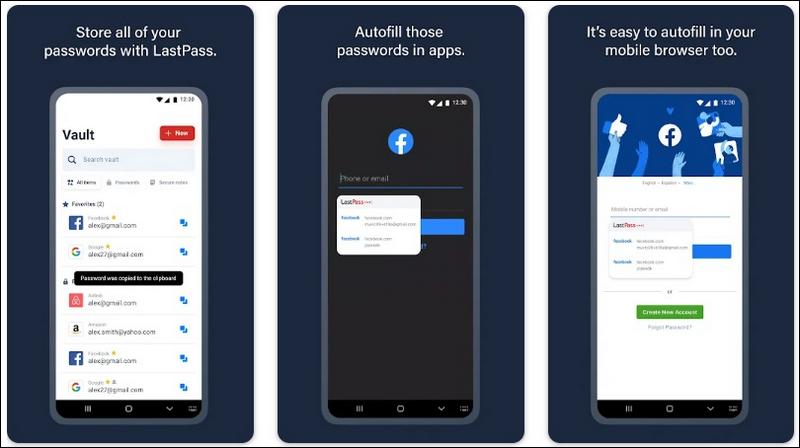
LastPass is a password manager designed to safeguard your online credentials and personal information. In an era where data breaches and identity theft are rampant, having a secure and reliable password manager is crucial.
LastPass allows you to store all your passwords in an encrypted vault, accessible with a single master password. This eliminates the need to remember multiple complex passwords for different websites and apps.
Beyond password storage, LastPass offers features like:
- Autofill: Automatically fills in your login credentials on websites and apps.
- Password Generator: Creates strong, unique passwords for your accounts.
- Secure Notes: Stores sensitive information like credit card details or Wi-Fi passwords securely.
- Two-Factor Authentication: Adds an extra layer of security to your LastPass account.
With LastPass, you can improve your online security, simplify your login process, and have peace of mind knowing your sensitive information is protected.
Read also: How to root Google Pixel 8a

3. Microsoft SwiftKey Keyboard
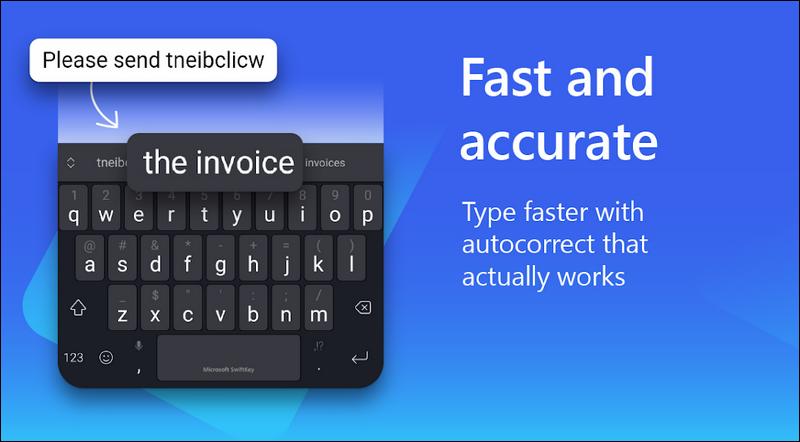
Tired of typos and slow typing? Microsoft SwiftKey Keyboard can be your best friend. This smart keyboard learns how you type and offers predictions to help you write faster and more accurately.
SwiftKey also lets you customize your keyboard with different themes and layouts. You can even resize it to fit your hands perfectly.
Here’s what makes SwiftKey stand out:
- Smart Predictions: It learns your writing style and suggests words you might want to use next. This can save you a lot of time and tapping.
- Swipe Typing: If you prefer to swipe instead of tap, SwiftKey has you covered. It’s smooth and easy to use.
- Customization: Make your keyboard your own with different colors, themes, and layouts.
- Multilingual Support: SwiftKey supports over 400 languages, so you can type in your native tongue or learn a new one.
If you’re looking for a keyboard that’s smart, customizable, and helps you type faster, give Microsoft SwiftKey Keyboard a try. It might just become your new favorite way to text!
Also read: Google Pixel Screen Not Responding/Flickering Issues

4. Canva
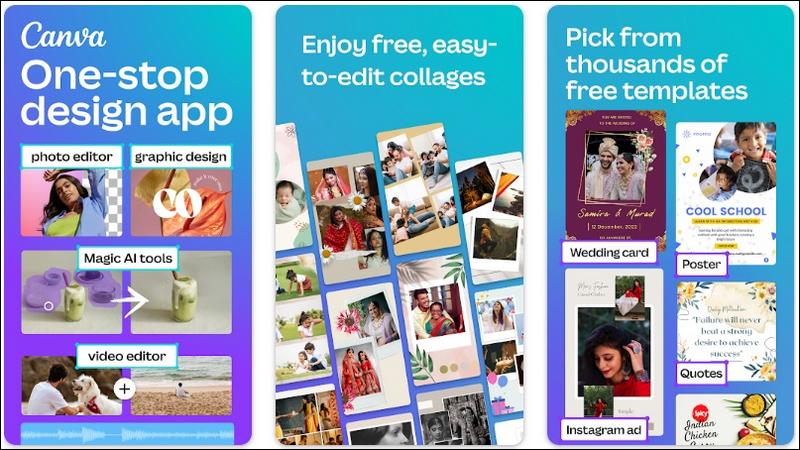
Canva is a user-friendly graphic design platform that empowers anyone to create stunning visuals. Whether you need to design a social media post, a presentation, a poster, or even a logo, Canva has you covered.
Its intuitive drag-and-drop interface makes it easy to create professional-looking designs, even if you have no prior design experience. You can choose from a vast library of templates, images, fonts, and graphics to create something truly unique.
Canva offers a free version with plenty of features, but it also has a paid subscription that unlocks even more options, including access to premium templates and stock photos.
Here’s why Canva is a must-have app for your Pixel 8a:
- Easy to Use: Even beginners can create amazing designs in minutes.
- Wide Range of Templates: Find the perfect template for any project.
- Customizable: Make your designs truly unique with your own photos, text, and branding.
- Collaborate: Work with others on designs in real-time.
- Share Easily: Download your designs in various formats or share them directly to social media.
Whether you’re a designer or just want to create something fun for your Instagram story, Canva has the tools you need to unleash your creativity and make your visuals shine.

5. Tasker
Tasker is like a super-smart helper for your phone. It can do all sorts of things automatically, so you don’t have to.
Want your phone to turn on silent mode when you’re at work? Tasker can do that. Want it to read your text messages out loud when you’re driving? Tasker can handle that too.
You can even teach Tasker to do really specific things, like change your wallpaper based on the weather or turn on your Wi-Fi when you get home. It’s like having a personal assistant for your phone, and the possibilities are endless!
Read also: 15 best games for Pixel 8 phone
If you’re the kind of person who likes to automate things and make your life easier, Tasker is definitely worth checking out. It might seem a little tricky to set up at first, but once you get the hang of it, you’ll wonder how you ever lived without it!

6. Solid Explorer
Solid Explorer is like a powerful toolbox for organizing everything on your phone. It helps you find, move, and manage your files easily.
Think of your phone’s storage like a big messy closet. Solid Explorer is like having a personal organizer who tidies everything up and puts things where they belong.
With Solid Explorer, you can:
- See all your files in one place, even the ones hidden in folders.
- Easily move files between your phone and your computer or cloud storage.
- Rename, copy, delete, and even compress files to save space.
- Open and edit different types of files, like documents and pictures.
- Protect your private files with a password.
If you have a lot of stuff on your phone, Solid Explorer can be a lifesaver. It makes it easy to keep everything organized and find what you need when you need it.

7. Signal
Want to keep your messages private? Signal is the app for you! It’s a messaging app that puts your privacy first.
Everything you send on Signal is encrypted, which means it’s scrambled up so no one else can read it. This makes Signal perfect for sharing sensitive information or just chatting with friends without worrying about anyone snooping.
Signal also has other cool features like disappearing messages, group chats, and voice and video calls.
Read also: 12 New ‘Android 15’ Features to Look Forward
If you care about privacy and want a secure way to chat with your friends and family, Signal is a great choice.


8. WPS Office
Need to work on documents, spreadsheets, or presentations while you’re out and about? WPS Office is the perfect solution for your Pixel 8a.
This all-in-one office suite lets you create, edit, and view all sorts of files, just like you would on a computer.
It’s like having a mini office right on your phone! You can write essays, crunch numbers, create stunning presentations, and even read PDFs.
WPS Office is compatible with Microsoft Office files, so you can easily open and edit documents created in Word, Excel, or PowerPoint. It also has cloud storage, so you can access your files from anywhere.
Here’s why WPS Office is a must-have for productivity on the go:
- All-in-one: It has everything you need to create and edit documents, spreadsheets, and presentations.
- Compatible: Works with Microsoft Office files, so you don’t have to worry about formatting issues.
- Cloud storage: Access your files from anywhere, on any device.
- Easy to use: The interface is simple and intuitive, so you can get started right away.
Whether you’re a student, a professional, or just someone who needs to get work done on the go, WPS Office is a great tool to have on your Pixel 8a.


9. Adobe Scan
Need to digitize a document but don’t have a scanner? No problem! Adobe Scan turns your Pixel 8a into a powerful scanning tool.
Simply point your phone’s camera at the document, and Adobe Scan will automatically capture a high-quality image and convert it into a PDF. You can then easily crop, rotate, and adjust the image to make it look perfect.
But Adobe Scan does more than just scan. It can also:
- Enhance Text: Make the text in your scanned documents sharper and easier to read.
- Combine Documents: Merge multiple scans into a single PDF.
- Sign Documents: Add your signature electronically to contracts and other important papers.
- Share Easily: Send your scanned documents via email or share them to cloud storage services like Google Drive.
Whether you need to scan receipts, business cards, or even handwritten notes, Adobe Scan is a convenient and versatile tool that makes it easy to digitize your documents on the go.

10. Cast to TV, Chromecast & Roku
Want to watch movies, shows, or videos from your phone on your TV? Cast to TV, Chromecast, and Roku devices are your answer!
These handy tools let you wirelessly send whatever’s on your Pixel 8a screen right to your TV. It’s like magic, but with technology!
Here’s how they work:
- Chromecast: This little device plugs into your TV and connects to your Wi-Fi. Then, you can use apps like YouTube, Netflix, or Spotify on your phone to “cast” the video or music to your TV. It’s like having a remote control for your TV that lives on your phone.
- Roku: This is similar to Chromecast, but it comes with its own remote and lots of apps built-in, so you can watch even more stuff.
- Cast to TV app: If you don’t have a Chromecast or Roku, you can still cast to some smart TVs using the Cast to TV app. This app is already on your Pixel 8a, so you don’t need to download anything extra.
Read also: 10 Best DLNA Streaming Apps For Android
With these tools, you can:
- Watch movies and shows on a bigger screen.
- Show off your vacation photos to your friends and family.
- Play mobile games on your TV for a more immersive experience.
So, if you’re ready to supersize your phone’s screen and enjoy all your favorite content on a bigger display, give casting a try!
With these 10 helpful apps, your Google Pixel 8a can do even more. You can make it look just the way you want, keep your information safe, get work done, and have tons of fun.
Which one of these is your favorite one? Or have something to share? Drop your comments below!
-
![Here's a list of 10 Best Translate English To Hindi Free Android Apps [2026]](https://androidcure.com/wp-content/uploads/2026/02/Best-Translate-English-To-Hindi-Free-Android-Apps-390x220.webp)
-

-

-

-
-

-

-

